The Transfer Credit Report (TCR) is used to display the evaluation of your transfer credit to WSU. It is generated at the time of an admissions decision for prospective students, and it is updated soon after any new transfer credit is received by the Office of Admissions for admitted and current students.
Please visit the WSU Admissions Submitting Transcripts website for guidance on sending transcripts to WSU. Transfer courses are evaluated for the following:
- University Common Requirements (UCORE) direct equivalencies or UCORE electives (UCORE/PHYSICS 1XX PSCI)
- Departmental direct equivalencies; non-UCORE (ex. ACCTG 230)
- Departmental electives (ACCTG 2XX) and general electives (Elective 1XX)
- Non-transferable courses (including, but not limited to courses that are below college-level or remedial, career/technical, or not sufficiently aligned to WSU’s curriculum offerings)
Watch a short video below to learn more about the Transfer Credit Report. Scroll down to access video transcript.
TCR VOICEOVER
SLIDES 1 & 2
Welcome to this short video about how to read your transfer credit report, also known as a TCR. The TCR shows the official course by course evaluation of your transfer credits we have record of. Transfer credit can only be added to a TCR once WSU Admissions has received official transcripts with final course grades or exam results.
SLIDES 3 & 4
Before we dive into specifics, let’s go over how to find your Transfer Credit Report. To find your TCR, sign into my.WSU, click on the academic advising tile, then click on view transfer credit report.
You will see something like this…
SLIDE 5
Let’s begin at the top of your TCR – You will see your transfer GPA and transfer hours. Side note: Any non-transferrable coursework, withdrawals, and repeats in which a C or higher was earned in a previous attempt are not calculated into your transfer GPA. Your transfer GPA will not affect your WSU GPA. However, individual transfer course grades can be used to determine whether you meet major requirements or course pre-requisites.
Below you will see any external degrees you have earned. If you haven’t earned a degree, the external degree section will not appear on your TCR. Regardless of degree status, you will also have a Transfer Credit Summary. This summary provides an overview of your lower- and upper-division credits and your transfer hours. Your credit hours represent the number of credits expected to transfer. If your Transfer Credit Summary box shows zeros, don’t worry—those will update once you’ve confirmed your seat at WSU.
SLIDE 6
For each course WSU has record of, you will see whether it transfers as a direct equivalent, a general or departmental elective, or if it is non-transferable (NT). Here are examples of how these transfer credits may show on your TCR.
Your TCR might be tough to interpret at first, so let’s break it down piece by piece.
SLIDE 7 (1)
You will see the name of the institution where your credit is from, or the “source institution”.
SLIDE 7 (2)
Main Bar
- Transfer term notes what year and term you are transferring in your credit.
- Year/term: This is the year you took the course, and the term in which you took it.
- The incoming course column is where you will see the course number from your transfer institution.
SLIDE 7 (3)
- Units taken represent the number of credits assigned to a course at your transfer institution. Credits are earned only if the course is successfully completed; they are not earned for withdrawals or failing grades.
- Grade input: you will see your grade with a T in front of it. The T means it is a transfer course.
SLIDE 7 (4)
- Equivalent course: this is where you will see what the equivalent course is here at WSU. This is followed by the course description to the right.
- Direct equivalencies
- General or departmental elective
- Non-transferable courses
SLIDE 7 (5)
- Units are the semester credit amount earned here at WSU. If your course work is transferred from a quarter institution to WSU, your quarter credits will be converted into semester credits. Using a simple calculation… Quarter credits x .67 = semester credits.
- The following grade section will match the transfer grade listed in the grade input column.
SLIDE 7 (6)
- University Common Requirements or UCORE: These are WSU’s general education requirements. If there is something in this area, the transfer course has a UCORE designation.
SLIDE 8
- WSU often requires full course sequences from quarter schools to match its semester courses. Sometimes two or more transfer courses combine to equal one WSU course, and partial sequences usually don’t transfer as equivalents. The Transfer Credit Report groups these courses and applies the grade from the final course in the series.
SLIDE 9
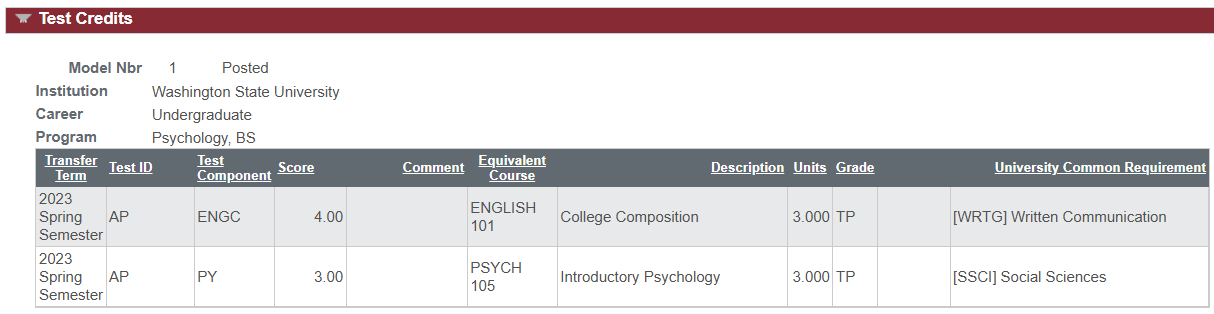
Test Credits are located at the bottom of the TCR; this is where you will find any scores from AP, IB, and others.
Military Credits are types of credits that can be added to the TCR. Please view our website to learn more.
Slide 10
Thanks for watching! We hope this helps you navigate your Transfer Credit Report with confidence. If you have any questions, don’t hesitate to reach out. And as always, go Cougs!
If there are any discrepancies with a transcript or new information becomes available regarding the evaluation of a course, please email transfer@wsu.edu to request an updated TCR.
How to Access a Transfer Credit Report
- Log in to myWSU and from the Student Homepage select the Academic Advising tile.

- From the Academic Advising menu select “View Transfer Credit Report”.

- The top of the Transfer Credit Report will show a summary of transfer hours and a transfer GPA used for Admissions purposes.
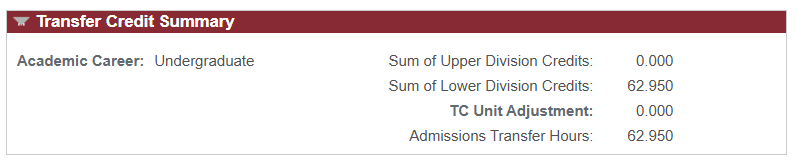
- If an external degree was earned it will also appear on the Transfer Credit Report.

- Below you will see a table showing equivalencies for courses taken at institutions other than WSU. The transfer equivalency, credits, grade, and any UCORE fulfillment are provided in the table.
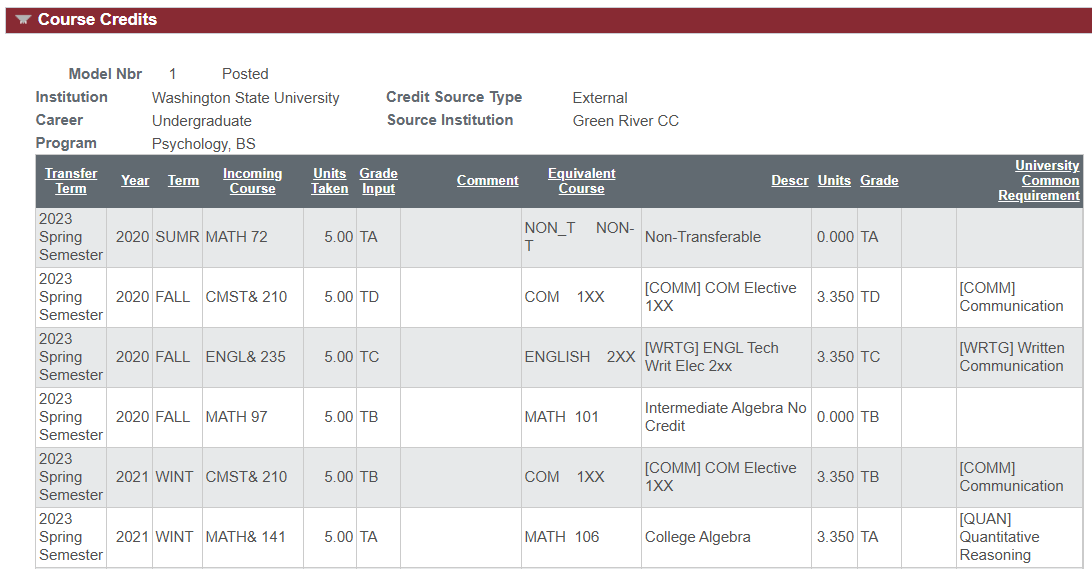
- Test Credit and Other Credits are located near the bottom of the page.