The Transfer Course Search Tool is a database that shows how courses from other institutions will transfer to WSU. Updated equivalencies are always being added, and the information is subject to change.
Please connect with your WSU admissions counselor or advisor to submit updated requests via the Course Evaluation Request Form. Please note the Transfer Course Search Tool does not guarantee applicability of transfer credit toward degree requirements.
How To Use the Database
Video Transcription
Welcome to this short video about how to use and interpret the Transfer Course Search tool. The Transfer Course Search tool is a database that displays how courses from other institutions will transfer to WSU.
You’ve clicked the link… now what?
- Click the Transfer Course Search link.
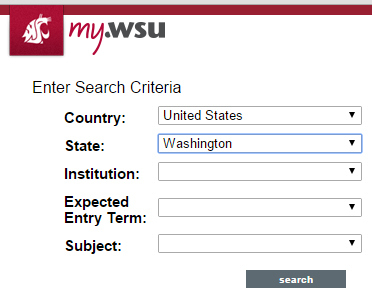
- It will then lead to a search criteria engine, you will want to find your state and institution
- The tool auto populates to Washington
- Leave the bottom two drop-down boxes blank.
- For demonstration purposes we are using Pierce College
- You will just need to wait patiently for it to load. Wait times may vary, but it can take a minute or two.
Let’s talk about how to read what you are seeing.
- All courses to the left of the arrow are from the transfer institution you are searching and everything to the right of the arrow is WSU’s course information
How do you best navigate this database?
- We recommend using the CTRL + F function, or command + F for MacBook users, to find your transfer courses.
- Be mindful of spelling and symbols as this is case sensitive.
- As you can see here, BIOL& 100 is equivalent to WSU’s BIOLOGY 102, and it satisfies a lab and the Biological Sciences UCORE.
If you have any questions about how a course is labeled or its equivalency, please contact the transfer center.
If you are searching for courses that satisfy UCORE specifically, you can filter the database by the courses that satisfy UCORE
- There are two ways to do so…
- You can click the UCORE button at the top of the tool. Adjusting the database in the order of what UCORE is satisfied
- Or using the CTRL + F function and searching the UCORE you are seeking
Please reach out with any questions you might have; we are always happy to help! Our contact information is listed below.
Go cougs!
The Transfer Course Search selection is used to display the WSU course equivalency if the transfer course is known. You can enter search criteria including state, transfer institution, WSU expected entry term, and subject. Search for all courses at an institution by selecting country or state and institution and leave the subject and entry term fields blank. All columns are sortable.
The Browse Transfer Course Information selection is used if the WSU course is known but not the transfer equivalency from another institution. The information provided by this tool should be used in conjunction with the WSU Catalog along with the catalog of the transfer/sending institution.
- Follow the link to the Transfer Course Search Tool
- Click Browse Transfer Course Information
- Find the WSU course prefix you are interested in searching by using the letters at the top of the page. For example, click “C” to find CHEM courses.
- Select the WSU course number
- If there are equivalencies for the selected course. You will be prompted to select a transfer institution and an Expected Entry Term. If you are already a WSU student, leave the Expected Entry Term blank.
- One you select an institution and click the search button, information about the transfer course(s) and its WSU equivalent will populate.
- Additional research will be needed to determine if and when courses are offered at a transfer institution.
Date Ranges and Validity of Transfer Course Equivalencies
A Date Range specifies the period of time that a specific transfer course equivalency is valid. Some equivalencies have been extended indefinitely and have a Date Range ending 12/31/9999. This end date will primarily appear for transfer courses that have recently been reviewed for UCORE, most Common Course Numbers, general electives, and non-transferable courses.
Periodically transfer courses change content and therefore may have an expired date range or end date in the database. If there is an equivalency with a date range that has expired, please fill out a Course Evaluation Request Form to have the course reevaluated.
Visit the Transfer Center’s glossary page for more information on the database and course equivalencies.
Transfer Credit Equivalency Database Codes
Listed below are common codes found in the Transfer Course Search Tool and how to interpret them.
Transfer course codes:
- SUBJECT ### – This code may appear as SUBJECT ###, 1##, 2##, etc. These courses are taken at the transfer institution. Courses with this code may be non-transferable, or they may transfer as an elective of the equal course level. (Example: JAPN 1## taken at the transfer institution may transfer to WSU as JAPANESE 1XX.)
- SUBJECT& – Courses with this designation are considered Common Course Numbers (CCN). They indicate that the content of these courses are similar throughout the Washington community college system.
UCORE Codes in the Transfer Credit Equivalency Database:
If any of the following codes appear in the “University Common Requirement” column, this indicates that a transferred course will be equivalent to a WSU course that satisfies the indicated UCORE category.
- Inquiry in the Creative and Professional Arts [ARTS]
- Quantitative Reasoning [QUAN]
- Written Communication [WRTG]
- Communication [COMM]
- Diversity [DIVR]
- Inquiry into the Humanities [HUM]
- Inquiry into the Social Sciences [SSCI]
- Inquiry into the Natural Sciences – Physical Sciences [PSCI]
- Inquiry into the Natural Sciences – Biological Sciences [BSCI]
- Inquiry Equity and Justice [EQJS]
WSU course codes:
- SUBJECT 1XX, 2XX, etc. – This code will appear when courses taken at the transfer institution transfer to WSU but do not have a direct equivalency to a WSU course. Example HIST 100 at the transfer institution may transfer to WSU as HISTORY 1XX. These courses may still satisfy UCORE requirements.
- ELECTIVE 1XX, 2XX, etc. – This code appears for courses that do not have a direct equivalency but transfer to WSU for elective credit. The appropriate departments and colleges determine the use of elective credit toward degree requirements.
- UCORE 1XX, 2XX, etc. – This code appears for some courses taken at the transfer institution that can be used towards fulfilling UCORE but do not have a direct equivalency to a WSU course.
- NON_T. – Non-transferable credits are credits that will not transfer to WSU. These credits may include but are not limited to:
- Courses taken at colleges or universities that are not regionally accredited
- Non-credit courses and workshops
- Remedial or college preparatory courses
- Sectarian religious studies
- Vocational-technical courses.