Planning your transfer to Washington State University? This self-guided process is designed to help you explore majors, preview how courses may transfer, and arrive prepared with questions as you plan your transition to WSU.
Using the tools listed below, you can create an unofficial transfer evaluation to understand your current progress and next steps:
- Your unofficial transcript(s) from each source of credit if there are multiple.
- Course Catalog – Schedule of Studies
- Transfer Course Search Tool
- Unofficial Evaluation Template
Understanding the Tools
WSU Catalog – Schedule of Studies
The Schedule of Studies identifies admission requirements and required courses for the major you select, helping you understand what coursework is needed to stay on track. The footnotes at the bottom provide important details about exceptions, substitutions, and additional requirements to consider.
- Visit the WSU Catalog page.
- Choose your intended campus (if you don’t see your campus or haven’t chosen one yet, choose the general option). Make sure your intended major is offered at the campus you want to attend.
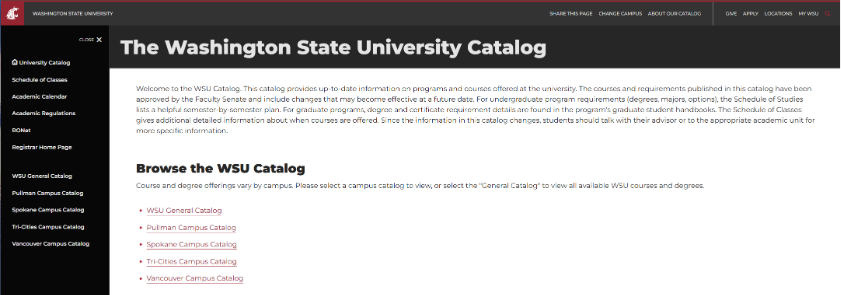
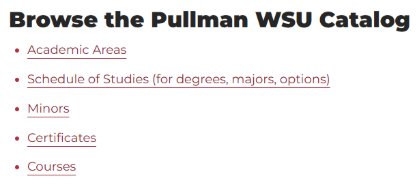
- Click the link that says “Schedule of Studies (for degrees, majors, options).
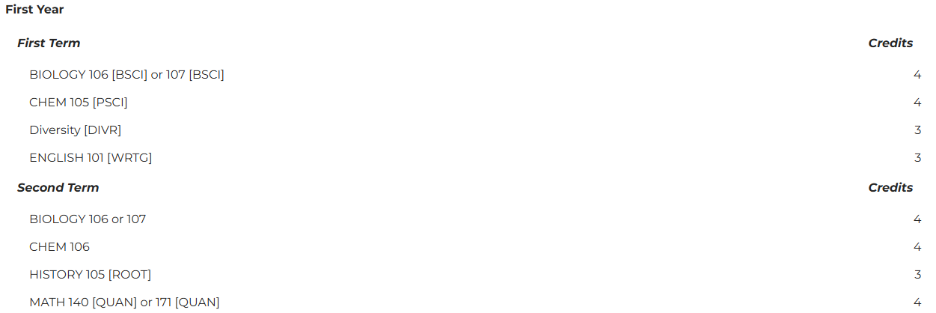
- Use the dropdown box

- Once you select a major, the requirements and information will populate.
The Transfer Course Search Tool shows how courses from other colleges or universities transfer to Washington State University. This searchable database displays WSU course equivalencies, including direct course matches, elective credit, and UCORE fulfillment.
To learn how to use the Transfer Course Search Tool, click the link above and watch the short informational video.
*The database is updated regularly, but results are subject to change and do not guarantee how credits will apply toward a specific degree. Students should use this tool alongside the WSU Catalog and consult with a WSU Academic Advisor for accurate academic planning.
Unofficial Evaluation Template
The Unofficial Transcript Evaluation Excel sheet is an advising tool you can use to organize completed and/or planned transfer coursework and show how it may apply to Washington State University degree/major requirements. You can list your transfer courses alongside WSU equivalencies (using the Transfer Course Search Tool) to indicate whether courses fulfill major requirements, count as electives, or are non-transferable.
To begin, you will need to add WSU major requirements from the Schedule of Studies, organized by academic year and term to help map transfer credit across a degree timeline (these courses are found on the Schedule of Studies), identify remaining requirements, and plan future coursework, if needed. It is helpful to use color-coded highlights to see how each course applies to these categories.
Please note that when you create an evaluation for yourself that this is an unofficial review and is intended for planning purposes only. Final transfer credit decisions are made after formal admission and official review by WSU offices and academic departments.
Putting It All Together
Using Butch T. Cougar’s transcript from Green River College, here is an example evaluation for the Biology (General Option) Major.
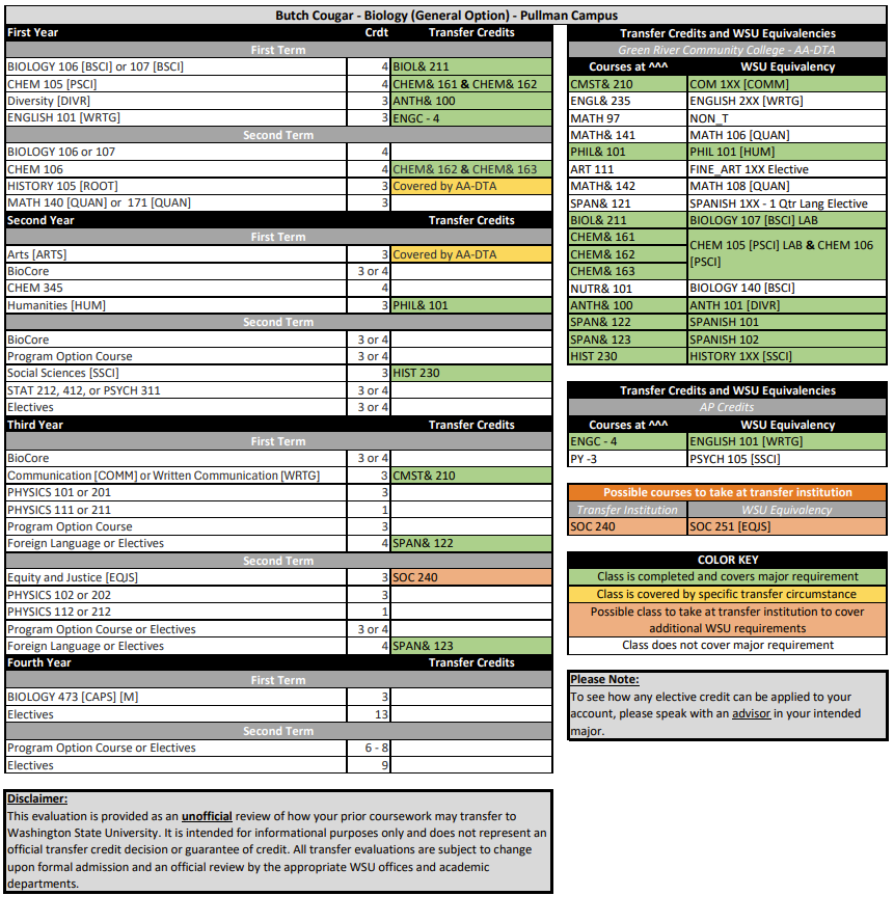
Butch’s transfer courses and their WSU equivalencies are listed on the right side of the spreadsheet. How they apply to major course plan requirements can be found on the left side along with the major requirements for Biology found on the Schedule of Studies page.
As you navigate the evaluation, here are a few tips to consider:
- Start by filling out the unofficial evaluation excel sheet with the required courses for your major from the Schedule of Studies on the left side of the sheet.
- Add your transfer credit from all previous institutions to the list on the right side of the excel sheet and add their WSU equivalent next to it. You can find the equivalencies on the Transfer Course Search Tool.
- Color code the courses using the Color Key below, if needed.
- Green = directly meets requirement
- Orange = can meet a requirement if taken at a transfer institution
- Yellow = applies under specific transfer circumstances
- Example: Butch’s AA-DTA from Green River College covers all general UCORE requirements and HISTORY 105 [ROOT] but does not cover [CAPS].
- Once transfer credit equivalencies are determined, any courses that meet a requirement can be added in the space to the right of the WSU requirement under the “Transfer Credits” heading.
- Add future/potential classes in the orange table titled “Possible Courses to Take at Transfer Institution” if you are still attending your transfer institution. We recommend using this area to help you plan and keep track of future courses. Confirm these courses with an academic advisor at your intended WSU campus before registering.
If you have questions about how your courses might meet your major electives, please contact an advisor in that department.
Final Step
Verify your evaluation with a staff member.
If you have major-related questions beyond how courses transfer, the best resource is a WSU major advisor. Advisor contact details can be found on the Advising at WSU website.
If you have questions about how courses transfer, how to use transfer tools, or any other transfer-related concerns, our team is here to help. Contact us via:
- Email – transfer@wsu.edu
- Phone – 509-335-8704
- By scheduling a virtual 1:1 appointment